
WhatConverts Review, I’ve been writing direct-response copy and auditing business systems for half a century. In that time, I’ve watched thousands of businesses bleed cash for one simple, infuriating reason: they have no idea which campaigns are actually making the phone ring.
They’re drowning in vanity metrics—clicks, impressions, bounce rates—but are completely blind to where their actual leads are coming from. Missing leads, clunky tracking workflows, and wasted ad spend are the silent killers of a growing enterprise.
Table of Contents
- What is WhatConverts?
- Key Features Breakdown: What's Under the Hood of WhatConverts Review?
- Pros and Cons (The Honest Truth)
- WhatConverts Pricing (2026): Is It Worth the Money?
- Who Should Use WhatConverts?
- WhatConverts vs Competitors
- Real Use Cases: Making It Practical
- Stop Guessing, Start Tracking
Here at ERP Linker, we spend our days ensuring systems talk to each other flawlessly. But if your front-end marketing isn’t accurately feeding your backend operations, your entire foundation is flawed. If you are treating your advertising budget like a casino—throwing chips at Google Ads and hoping for a return—you need a reality check. You need attribution.
In this brutally honest WhatConverts review, we’re taking a magnifying glass to what might be the best lead tracking software on the market today. No fluff, no hype—just exactly what you need to know to decide if it’s right for your bottom line.
What is WhatConverts?
In simple terms, WhatConverts is a closed-loop lead tracking and attribution platform. While most basic analytics tools tell you how many people visited your site, WhatConverts tells you exactly who contacted you, what channel brought them there, and how much revenue they represent.
It captures every phone call, web form submission, and chat interaction, tying each one back to the specific marketing source (right down to the exact search keyword).
Who is it built for?
- Marketing Agencies: You need to prove ROI to your clients without spending 10 hours a month building spreadsheets.
- Local Services & Healthcare: Plumbers, roofers, dentists, and lawyers whose primary lifeblood is inbound phone calls and quote forms.
- Data-Driven Marketers & Integrators: Anyone obsessed with lowering Cost Per Acquisition (CPA) and feeding clean data into their CRM or ERP.
Key Features Breakdown: What’s Under the Hood of WhatConverts Review?
Forget the tech jargon. Here is how these features actually make you money.
1. Dynamic Call Tracking
The Feature: WhatConverts swaps out the phone number on your website based on how the visitor arrived (Google Ads, Organic Search, Facebook, etc.). The Benefit: You know exactly which ad campaigns are ringing the register. You can stop funding the campaigns that just generate clicks and double down on the keywords that deliver paying customers. Plus, call recording lets you spot-check your sales team to ensure they aren’t fumbling hot leads.
2. Form Tracking
The Feature: It automatically captures every web form submission and ties it to the user’s digital journey. The Benefit: No more “web lead” mystery. You get the name, email, and the exact path they took to submit that “Request a Quote” form. It bridges the critical gap between digital clicks and physical sales.
3. Chat Tracking
The Feature: Seamlessly integrates with your live chat widgets. The Benefit: Often overlooked, chat is a massive conversion point. WhatConverts ensures you don’t lose attribution data just because a prospect preferred to type instead of talk.
4. Multi-Touch Lead Attribution and WhatConverts Review
The Feature: Available on higher tiers, this tracks the entire customer journey from the first click to the final conversion. The Benefit: Customers rarely buy on the first click. This shows you the complete narrative—maybe they found you via SEO, clicked a retargeting ad on Facebook three days later, and finally called. You’ll know exactly how your full funnel is performing.
5. The Reporting Dashboard
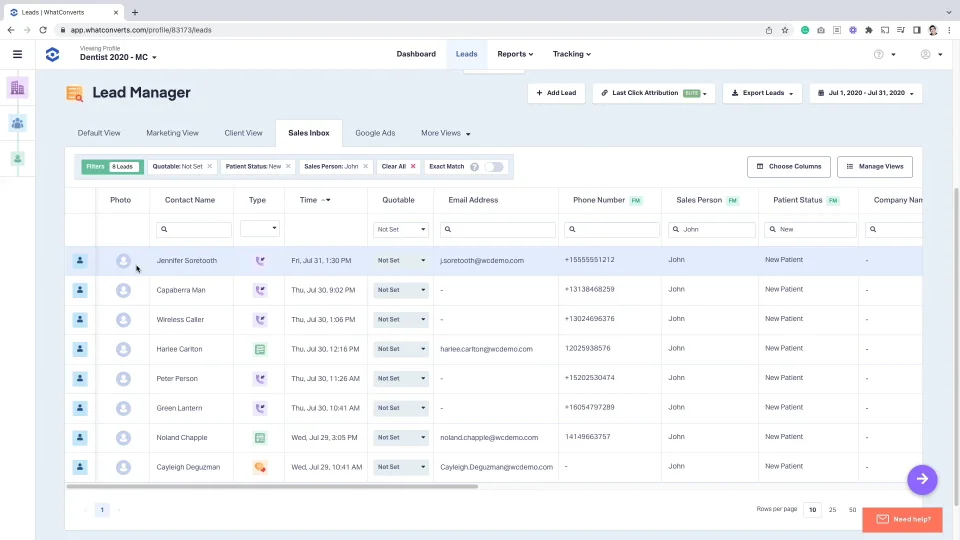
The Feature: Real-time, highly visual reports detailing lead sources and keyword performance. The Benefit: It builds instant trust with stakeholders. You can generate a report in seconds that unequivocally states: “We spent $2,000 on Google Ads, which generated 45 qualified phone calls and $18,000 in pipeline value.”
Pros and Cons (The Honest Truth)
I don’t trust reviews that only paint a rosy picture. Here’s the good, the bad, and the ugly.
The Pros
- All-in-One Simplicity: Tracking calls, forms, and chats in one centralized dashboard is a massive time-saver compared to stringing together disparate tracking tools.
- Agency-Friendly Pricing: The unlimited account pricing tiers and white-label reporting options are absolute goldmines for teams managing dozens of clients.
- Ease of Integration: For an ecosystem like ERP Linker, the ability to seamlessly push this lead data via webhooks or native integrations into other CRMs is crucial.
- HIPAA Compliance: Available on the Pro plan, making it a highly viable option for medical and dental practices.
The Cons
- Feature Gating: Crucial advanced features like the Customer Journey (multi-click attribution) are gated behind the most expensive “Elite” tier.
- Basic Conversation Intelligence: While it tracks and records calls perfectly, its built-in AI transcription and sentiment analysis aren’t as deeply developed natively as some heavy-duty enterprise call center software.
WhatConverts Pricing (2026): Is It Worth the Money?
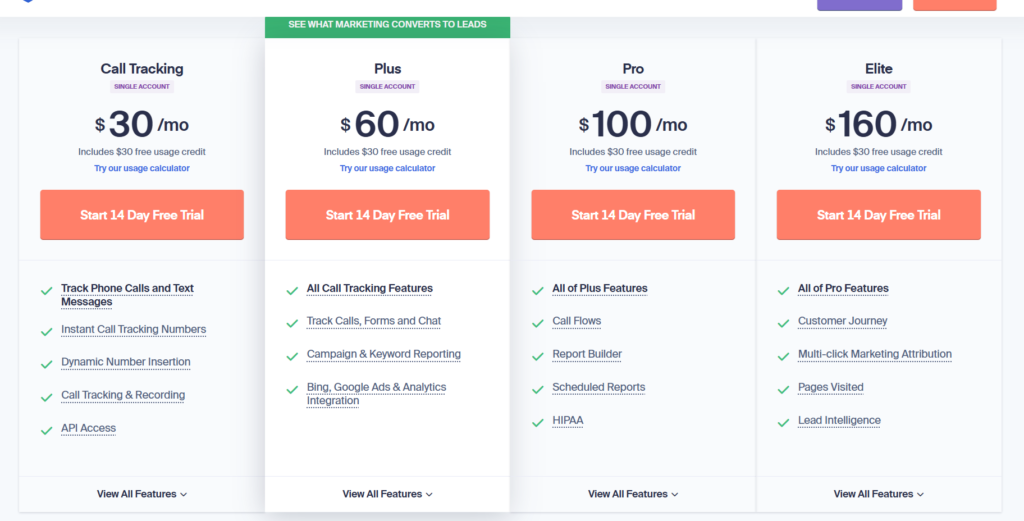
Understanding WhatConverts pricing is essential before you dive in. They operate on a predictable tiered subscription model, plus usage costs if you exceed the generous free credits included in your plan.
- Call Tracking ($30/mo): The entry-level plan. Great if you only care about calls, but you’re missing out on vital form and chat data. (Includes a $30 usage credit).
- Plus ($60/mo): The Sweet Spot for Small Businesses. Tracks calls, forms, and chats. If you’re a local business, start here.
- Pro ($100/mo): Adds call flows, custom report builders, and HIPAA compliance. Essential for healthcare or businesses with complex routing needs.
- Elite ($160/mo): Unlocks the holy grail: multi-click marketing attribution and the full customer journey map.
- Agency Plans (Unlimited Accounts): Ranging from $500 to $1,250/mo, these are flat-rate solutions allowing agencies to onboard unlimited clients without getting nickel-and-dimed.
The Value Verdict: At $60/month for the Plus plan, WhatConverts pays for itself the very first time you identify and kill a single failing $100/month ad campaign.
Who Should Use WhatConverts?
You are the ideal user if:
- You run a marketing agency and need definitive proof of ROI to retain your clients.
- You manage high-ticket local service campaigns (HVAC, Legal, Dental) where a single phone call is worth thousands.
- You require clean, attributed lead data to sync seamlessly with your backend systems.
You should avoid it if:
- You are running a 500-seat outbound enterprise call center (you need a dedicated PBX solution instead).
- You run a purely e-commerce business where traditional web analytics handle 100% of your cart conversions, and nobody ever calls your business.
WhatConverts vs Competitors
When looking at WhatConverts alternatives, the elephant in the room is usually CallRail.
- WhatConverts vs. CallRail: CallRail is an excellent platform and often considered the industry standard. However, WhatConverts tends to have a stronger, more intuitive focus on overall lead management (combining forms and chats) straight out of the box, whereas CallRail is historically call-first. WhatConverts’ agency pricing model with unlimited accounts is also highly aggressive and attractive compared to per-client billing.
- WhatConverts vs. CallTrackingMetrics (CTM): CTM is phenomenal but leans heavily toward complex call center operations. If you are just trying to track lead attribution, CTM can feel like flying a 747 to go to the grocery store. WhatConverts is the sports car: fast, focused, and built specifically for marketing ROI.
Real Use Cases: Making It Practical
Scenario 1: The Agency Proving ROI
An agency runs PPC for a local roofing company. The client threatens to pause the campaign because “we aren’t getting any leads.” The agency opens the WhatConverts white-labeled dashboard and shows the client 14 recorded phone calls and 8 quote form submissions from the past 30 days, all explicitly tagged “Google Ads.” The retainer is saved.
Scenario 2: The Local Business Optimizing Spend
A personal injury attorney is spending $5,000/month on billboards and $5,000/month on Google Ads. Using dynamic number insertion online and a static tracking number on the billboard, the attorney realizes the billboard generated zero calls, while Google Ads brought in 40. They cut the billboard, doubled the digital budget, and doubled their caseload.
Stop Guessing, Start Tracking
In direct response, we have a saying: If you can’t measure it, you can’t manage it. Continuing to spend money on marketing without a rock-solid lead tracking system is professional malpractice.
WhatConverts gives you the exact blueprint of what is working in your business. It transforms marketing from an unpredictable expense into a predictable, measurable investment. Don’t wait until the end of the quarter to realize you’ve blown your budget on the wrong keywords.