What is an ERP System confused? Right, let us be honest. The term “ERP” has been used by software vendors for so long, in so many different contexts, that it has lost almost all meaning for the average business owner.
You have heard it. You have nodded along in meetings when someone mentioned it. But deep down, you are not entirely sure what it actually does — or whether your business actually needs one.
This guide is for you.
No jargon. No vendor hype. Just a clear, honest explanation of what an ERP system is, how it works, what it costs, and how to know if it is right for your business — written for people who run businesses, not people who implement software for a living.
The One-Sentence Definition
An ERP (Enterprise Resource Planning) system is software that connects all of your business departments — finance, inventory, operations, purchasing, sales, and HR — into a single, unified system so that everyone works from the same data.
That is it. That is what ERP is.
Everything else — the modules, the implementations, the integrations, the technical architecture — is just the “how” of making that definition a reality for a specific business.
Why the Name “Enterprise Resource Planning” Is Terrible
The name was coined in the 1990s by a research firm called Gartner to describe a new generation of manufacturing scheduling software. It stuck — even though it communicates almost nothing useful about what the software actually does.
“Enterprise” makes it sound like it is only for giant corporations. It is not. In 2026, ERP systems exist at every price point, from free open-source platforms to six-figure enterprise contracts.
“Resource Planning” sounds like scheduling and logistics. But modern ERP covers finance, accounting, purchasing, inventory, fulfillment, CRM, HR, manufacturing, and more.
The name is a historical artifact. Focus on the function, not the label.
What Is an ERP System? The Problem ERP Solves: A Story Every Business Owner Recognizes
Imagine you run a product business. You have:
- QuickBooks for accounting and invoicing
- Shopify for your online store
- A spreadsheet for tracking inventory
- Excel for purchase orders with your suppliers
- Another spreadsheet for your sales team’s pipeline
- Email for communicating with your warehouse team
Each of these systems works fine in isolation. But they do not talk to each other.
So when your Shopify store sells 50 units of your best-selling product, your inventory spreadsheet does not automatically update. Your purchasing team does not automatically know to order more stock. Your accountant does not automatically see the revenue entry. Your warehouse team finds out about the orders by checking their email — sometimes.
The result: decisions are made on stale data. Mistakes happen. People spend hours each week manually moving information from one system to another. And as your business grows, the problem compounds — more orders, more products, more people, more spreadsheets, more chaos.
This is the problem ERP solves. It replaces the disconnected patchwork of systems with a single platform where every department sees the same real-time data.
How an ERP System Actually Works
An ERP system is built around a central database that all departments share. When any action occurs in any part of the business, it is recorded once in that central database — and immediately visible to every other part of the system that needs it.
Here is a simple example of how an order flows through an ERP:
- Customer places an order (via Shopify, phone, or sales rep)
- Sales module records the order and checks credit terms
- Inventory module immediately reduces available stock and checks if fulfillment is possible
- Warehouse module generates a pick list and routes the order to the right picker
- Shipping module generates the shipping label and tracking number
- Finance module automatically creates an invoice and accounts receivable entry
- Reporting dashboard reflects the sale in real-time revenue metrics
All of this happens in a single connected system. No emails. No spreadsheets. No manual data entry at any step.
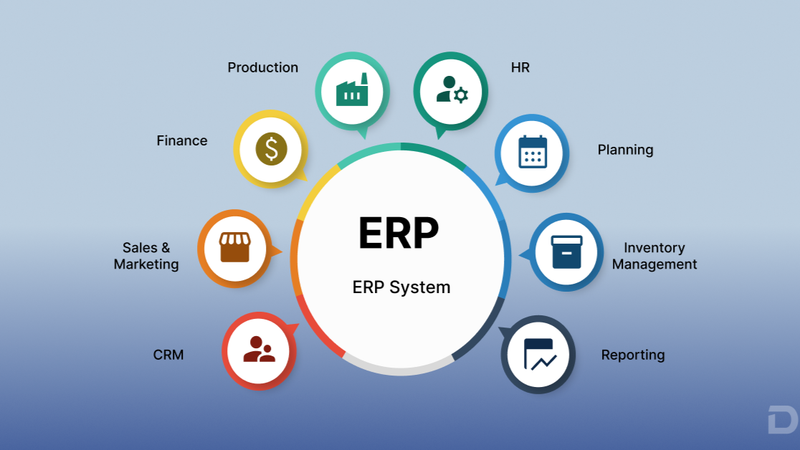
The Core Modules of a Modern ERP System
Modern ERP systems are modular — meaning you implement the modules you need and can add more over time. Here are the most common modules and what they do:
Financial Management
The accounting backbone of the ERP. Handles general ledger, accounts payable, accounts receivable, budgeting, cash flow management, tax compliance, and financial reporting. This replaces standalone accounting software like QuickBooks for most mid-size businesses.
Inventory and Warehouse Management
Tracks stock levels across all locations in real time. Manages product master data, SKUs, variants, lot/serial numbers, warehouse locations, and bin management. Drives pick-pack-ship workflows for fulfillment teams.
Order Management
Captures and processes orders from all channels (eCommerce, phone, EDI, sales reps). Manages order routing, fulfillment priority, backorder handling, and order status tracking.
Purchasing and Procurement
Manages your relationships with suppliers. Handles purchase order creation, approval workflows, goods receipt, supplier performance tracking, and cost management.
Sales and CRM
Tracks customer relationships, sales opportunities, quotes, contracts, and order history. Provides sales teams with complete customer visibility to drive better decisions.
Manufacturing and Production
For businesses that make products: manages bills of materials, production scheduling, work orders, capacity planning, and quality control.
Human Resources and Payroll
Manages employee records, time and attendance, payroll processing, benefits administration, and compliance reporting.
Reporting and Business Intelligence
Aggregates data from all modules into real-time dashboards, KPI tracking, and custom reports — giving leadership a complete view of business performance at any moment.
ERP vs. Accounting Software: What Is the Difference?
This is one of the most common questions business owners ask.
Accounting software (QuickBooks, Xero, FreshBooks) is a financial tool. It records transactions, tracks payables and receivables, reconciles bank accounts, and generates financial statements. It does one job — finances — and does it reasonably well.
An ERP system includes all of the accounting functionality — and extends it to cover your entire operation. The key difference is that an ERP connects your financial data to your inventory data, your order data, your purchasing data, and your fulfillment data in real time.
With accounting software alone, your accountant sees a sale when someone manually enters the invoice. With an ERP, your accountant sees the sale the moment it is placed — along with the inventory cost, the fulfillment status, the customer history, and the margin impact.
| Feature | Accounting Software | ERP System |
|---|---|---|
| Financial statements | ✅ | ✅ |
| Accounts payable/receivable | ✅ | ✅ |
| Tax compliance | ✅ | ✅ |
| Inventory management | ❌ or Basic | ✅ |
| Order management | ❌ | ✅ |
| Purchasing / POs | ❌ or Basic | ✅ |
| Warehouse management | ❌ | ✅ |
| Manufacturing | ❌ | ✅ (in some ERPs) |
| CRM | ❌ | ✅ (in some ERPs) |
| Real-time cross-department visibility | ❌ | ✅ |
Cloud ERP vs. On-Premise ERP: Which Should You Choose?
On-Premise ERP: The software is installed on servers that your company owns and manages. You pay a large upfront license fee and handle your own maintenance, updates, and security. This was the only option until the 2000s.
Cloud ERP (SaaS): The software is hosted by the vendor and accessed via a web browser. You pay a monthly or annual subscription. The vendor handles all maintenance, updates, and infrastructure.
In 2026, cloud ERP is the right choice for virtually all small and mid-size businesses — and for many enterprises too. The advantages are overwhelming:
- Lower upfront cost (no hardware, no large license fee)
- Automatic updates and security patches
- Access from anywhere on any device
- Faster implementation timelines
- Predictable subscription pricing
- Vendor-managed disaster recovery and backups
The only scenarios where on-premise still makes sense are large enterprises with strict data sovereignty requirements, highly customized legacy systems, or industries with specific regulatory constraints on cloud data storage.
The Most Popular ERP Systems in 2026
| ERP System | Best For | Starting Price |
|---|---|---|
| Oracle NetSuite | Mid-market to enterprise | $1,000+/month |
| SAP S/4HANA | Large enterprise | $2,000+/month |
| Microsoft Dynamics 365 | Mid-market to enterprise | $800+/month |
| Odoo | SMB to mid-market | Free–$350/month |
| ERPNext | SMB (open source) | Free–$500/month |
| Acumatica | Mid-market, eCommerce | $1,000+/month |
| Sage X3 | Mid-market | $700+/month |
| Brightpearl | eCommerce-native | $375+/month |
Do You Actually Need an ERP? The Honest Answer
Not every business needs a full ERP system. Here is how to think about it:
You probably do NOT need an ERP yet if:
- Your revenue is under $1M annually
- You are running a single-channel, simple product business
- Your team is small enough that everyone communicates directly
- Your current software tools (accounting + eCommerce) are not causing significant friction
You probably DO need an ERP if:
- Your team is spending 10+ hours per week on manual data entry between systems
- You have frequent inventory errors, oversells, or fulfillment mistakes
- You are making business decisions based on data that is more than 24 hours old
- You are managing purchasing, fulfillment, and finance across separate disconnected tools
- You are growing into B2B, international markets, or multiple channels
- Your accountants are spending significant time reconciling data between systems
The inflection point for most product businesses is somewhere between $2M and $5M in annual revenue — when the complexity of running the business on disconnected tools starts to visibly drag on growth.
What Does ERP Implementation Actually Look Like?
ERP implementation is not a small undertaking. Here is an honest overview of the process:
Phase 1 — Discovery and Planning (4–8 weeks). Document your current processes, define your requirements, select your ERP system, and choose your implementation partner.
Phase 2 — Configuration and Customization (8–20 weeks): Configure the ERP to match your business processes. Customize where necessary. Build integrations with other systems (eCommerce, shipping, payment processors).
Phase 3 — Data Migration (4–8 weeks, parallel) Clean and migrate your historical data — customers, products, suppliers, financial history — into the new ERP.
Phase 4 — Training (2–4 weeks): Train your team on the new system. This is where most implementations fail if it is rushed.
Phase 5 — Go-Live and Hypercare (2–4 weeks) Launch the system and run intensive monitoring and support while the team adjusts.
Phase 6 — Optimization (Ongoing): Continuously improve processes, reports, and automations as you learn how the system behaves in production.
Total timeline: 4–18 months, depending on complexity and company size.
The Hidden Costs of ERP — What Vendors Do Not Lead With
Implementation services: Many ERP vendors quote software licensing costs prominently and implementation costs quietly. Implementation can easily cost 1–3x the annual software license.
Data migration: Cleaning and migrating historical data is more expensive and time-consuming than almost every business expects.
Training: Skimping on training is the #1 cause of ERP implementation failure. Budget for it generously.
Change management: People resist change. A new ERP requires process changes in every department. Without active change management, adoption suffers.
Integration costs: If you are running Shopify, a 3PL, shipping carriers, and marketing tools alongside your ERP, each integration has a cost.
Ongoing maintenance and optimization: ERP systems require ongoing administration, updates, and tuning. Factor in the ongoing cost of an internal system administrator or an external managed service.
ERP and Shopify: Why Integration Matters
If you are running your business on Shopify, connecting your ERP to your store is one of the highest-leverage decisions you can make.
Without integration, your ERP and Shopify live in separate worlds — and your team manually bridges the gap with exports, imports, and data entry. With integration, every order, every inventory movement, every return, and every financial transaction flows automatically between the two systems.
The result: real-time visibility, eliminated manual work, inventory accuracy that actually matches reality, and financial data that closes on time — every time.
Read the full guide: Shopify ERP Integration: The Complete 2026 Guide
Conclusion: ERP Is Not a Technology Decision — It Is a Business Decision
The question “should we implement an ERP?” is really asking: “Are we ready to run our business as a unified, data-driven operation?”
ERP is the infrastructure of operational maturity. It does not change your products, your brand, or your customer relationships. But it changes everything about how efficiently you operate, how clearly you see your business, and how confidently you can make the decisions that drive growth.
For businesses at the right stage, ERP is not an expense. It is the foundation that makes every other investment perform better.
If you are asking the question, you are probably closer to ready than you think.